 Physics Shark































Magic Aim
Looking for a shooting game you can play at school? Magic Aim loads straight in your browser on Physics Shark: free, unblocked and nothing to install. Play it on a school Chromebook, a laptop, a phone or a tablet.
Show moreShow less
Play Magic Aim unblocked
Looking for a shooting game you can play at school? Magic Aim loads straight in your browser on Physics Shark: free, unblocked and nothing to install. Play it on a school Chromebook, a laptop, a phone or a tablet.
What is Magic Aim?
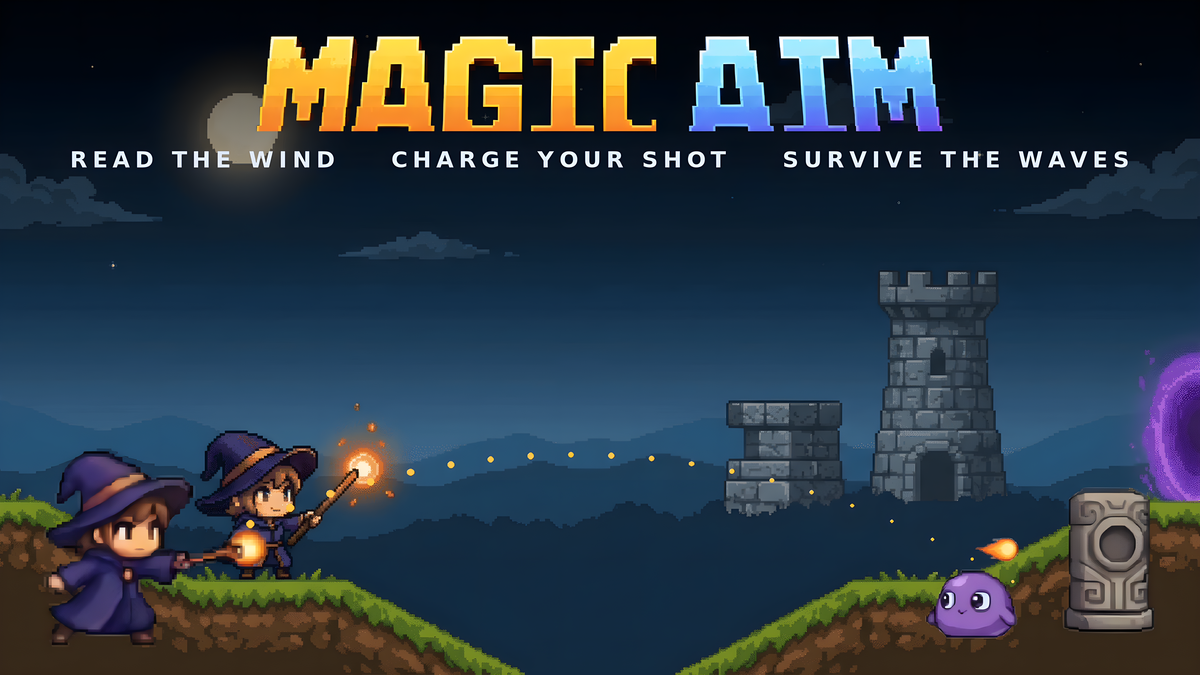
Magic Aim is a real-time arcade artillery game starring a chibi magician. Read the shifting wind, charge your wand, and fire arcing elemental blasts that split in mid-air to clear waves of monsters across hilly terrain. Dash for a better angle, raise an energy shield to block incoming fire, grab item drops that supercharge your next shots, then warp to a fresh layout. Unlike classic turn-based artillery games, every shot is live and fast — mastery is reading arcs and wind on the fly. Four elements (Fire, Water, Thunder, Earth) each fly differently, so swapping changes how you read the same shot. Pixel-art, juicy, and easy to pick up for a quick run.
How to play Magic Aim
Survive escalating waves of monsters and score as high as you can. Clear every monster in a layout to warp to the next, tougher one — your run ends when you're defeated. Score rewards kills, speed, accuracy and style (splits and perfect blocks).
Aim toward your cursor and watch the wind gauge — wind pushes your shot mid-flight and shifts every few seconds. Hold to charge for power, release to fire; shots can split at the apex into a fan for crowd control. Raise your shield just before an enemy shot lands for a perfect block (mana refund + speed burst). Walk to reposition and grab item drops that buff your shots.
Controls (desktop):
- Aim — Mouse
- Charge & fire — hold / release Left Mouse
- Energy shield — Right Mouse or Space
- Move — A / D (or ← / →)
- Dash-warp — double-tap ← or →
- Swap element — 1–4
- Pause — Esc
Mobile: virtual joystick + drag-to-aim + on-screen fire/shield buttons.
Magic Aim controls
- Mouse: Aim
- Charge & fire: hold / release Left Mouse
- Right Mouse or Space: Energy shield
- A / D (or ← / →): Move
- double-tap ← or →: Dash-warp
- Esc: Pause
Magic Aim FAQ
Is Magic Aim free to play?
Yes. Magic Aim is free on Physics Shark, with nothing to download and no account to make.
Can I play Magic Aim unblocked at school?
Magic Aim runs in a normal browser tab with no install, so it plays on school Chromebooks and laptops, with nothing to install and no account.
Does Magic Aim work on phones and tablets?
Yes. It works with touch controls on phones and tablets, and with a keyboard and mouse on computers.
- LikedNo votes yet
- Rank#2854 of 2870
- PlaysBe the first!
- UpdatedNovember 2026
Gameplay
About this game
- Controls
- MouseAim
- Charge & firehold / release Left Mouse
- Right Mouse or SpaceEnergy shield
- A / D (or ← / →)Move
- double-tap ← or →Dash-warp
- EscPause
- Supported devices
- Desktop, phone and tablet
- Genre
- Shootermagicshootingskillshoot em up2d action














